


Gemini Omni AI video generator

Google's video model, in ChatCut: change the weather or light of a clip you shot and keep the people and the camera move, extend it without a cut, or make a new 3 to 10 second clip with sound.

Gemini Omni 1.1 Flash 16:9 6s

Trusted by 400,000+ creators

What is Gemini Omni?

Gemini Omni is Google's family of video models, announced at Google I/O 2026. Gemini Omni 1.1 Flash, released on August 27, 2026, makes 3 to 10 second clips with sound from a prompt, a first frame, a first and last frame or reference images, and it can edit or extend a video you already have. Google released a newer Gemini Omni 1.2 Flash on November 5, 2026. ChatCut's Video Gen menu offers Gemini Omni 1.1 Flash, and every clip on this page was made with it in ChatCut on November 20, 2026.

3–10s

Per clip

with sound, 16:9 or 9:16

10s

Of context

read from your clip to extend it

1/3

The price

of 720p for a 360p preview

4K

Upscaled

or 1080p, from the clip

Google's figures for Gemini Omni 1.1 Flash, from its August 27, 2026 announcement and its developer docs. Sources: Google: Gemini Omni 1.1 Flash · Google: Introducing Gemini Omni · Google Cloud: edit videos with Omni · Google: Gemini Omni 1.2 Flash

What Gemini Omnidoes well

Google's claims for Gemini Omni, each shown with a clip made with Omni 1.1 Flash in ChatCut for this page.

Change a clipyou shot,keep the people

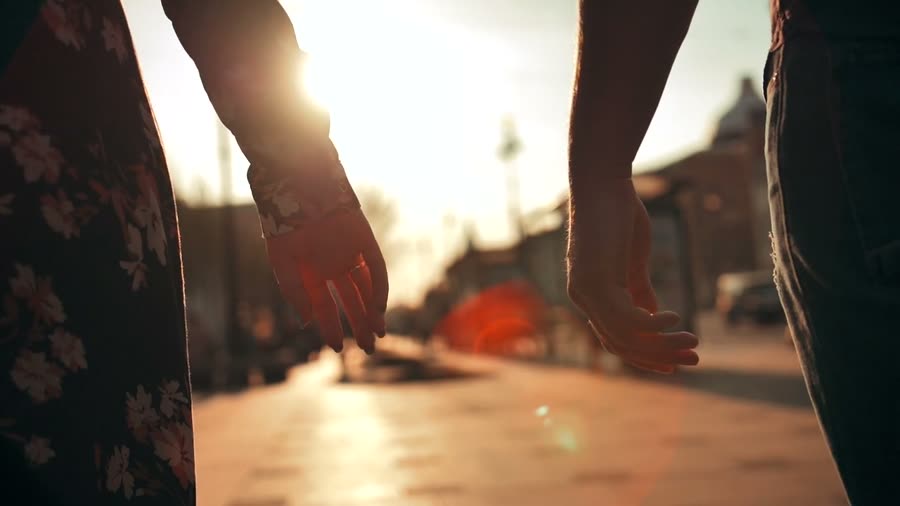
This started as a real 8-second street clip from Pixabay, shot at golden hour. We asked Omni for a snowy evening and told it to keep everything else. The two hands reaching for each other, the pattern on her dress, the walk and the camera move came back the same, now with falling snow, cold blue light and lit street lamps. At 720p it cost 4.25 credits.

Keep a shotgoing withouta cut

Google says Omni 1.1 Flash reads up to 10 seconds of your clip before it continues it, where earlier models looked only at the last second. We gave it the same 8-second street clip and asked for more of the walk. It came back 12 seconds long, the original plus 4 new seconds in which the hands join, for 2.29 credits.

It works outwhat happensnext

Google says Omni doesn't just make a scene look real; it reasons about what should happen next, with an understanding of physics. Here the retriever walks out of the lake and shakes, and the water flies off its coat into the low sun.

Sound comes inthe same pass

Every Omni clip on this page came back with sound. Write it into the prompt: for this one we asked for the roar of the furnace, a breath into the pipe and the glass crackling. The shot moves from the swelling glass to his face as he blows.

Every way to use Omni in ChatCut

In Video Gen, Omni has four inputs: frames, image references, Edit video and Extend video. A first frame and reference images are separate modes, and Omni takes images only, no reference video or audio. Here is what went in, and what came out, all at 720p.

One image, brought to life

Start from a still. The clip opens on your frame, then the puppy yawns, stretches its paws across the floor and rolls onto its back. Five seconds cost 2.46 credits.

  1. First frame: Image First frame Image
Gemini Omni 1.1 Flash · 16:9 · 5s · 720p
See the prompt

Start exactly on this frame. The sleeping golden retriever puppy twitches its nose in the sunbeam, opens its eyes, gives a big yawn and stretches its front paws across the wooden floor, then rolls onto its back on the knitted blanket. The camera stays low and still. Sound: a soft yawn, a small squeak, a quiet room.

A product and a place, from two images

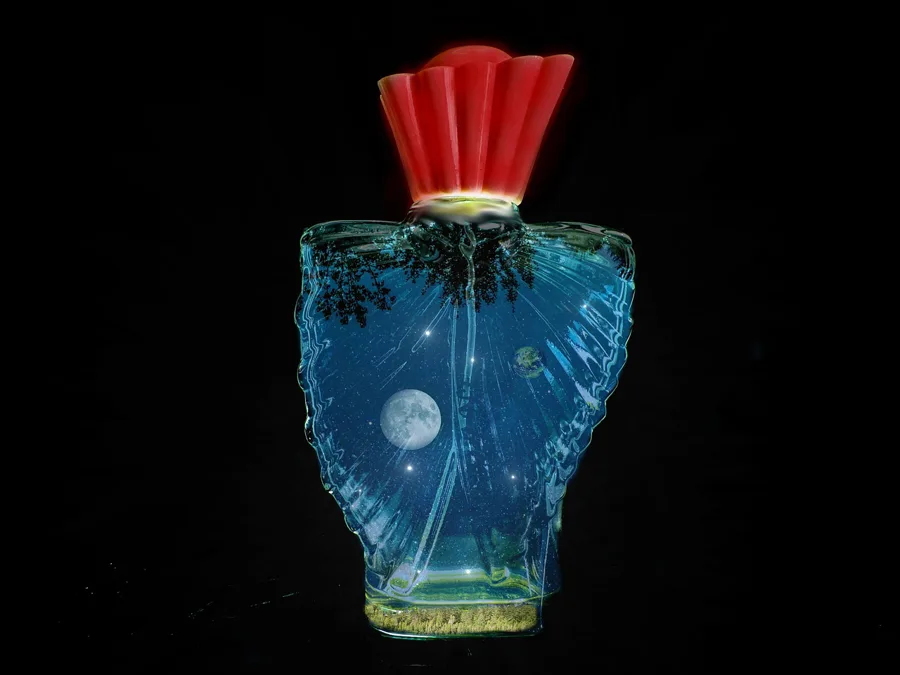
One photo of the product, one image of a harbour. The bottle's shape and red cap stay close to the photo while the camera arcs around it, with the harbour behind. Omni takes up to 3 reference images.

  1. Image 1: Product photo Image 1 Product photo
  2. Image 2: Place Image 2 Place
Gemini Omni 1.1 Flash · 16:9 · 5s · 720p
See the prompt

Product shot. Place the exact perfume bottle from the first reference image (fluted red cap, blue glass body with a moon and stars inside) on a sunlit stone wall above the harbour from the second reference image, the pastel houses and fishing boats soft in the background. The camera slowly arcs around the bottle as morning light passes through the blue glass. Keep the bottle unchanged. Sound: gulls, water lapping. No text.

Edit a clip you already have

Choose Edit video, drag a project video of up to about 10 seconds into the source slot and describe the change. This real 8-second clip became a snowy evening, with the people, their movement and the framing kept.

  1. Source video: Real clip · 8s Source video Real clip · 8s
Gemini Omni 1.1 Flash · 16:9 · 8s · 720p · edit
See the prompt

Turn this golden-hour street into a snowy winter evening: snow falling and settled on the pavement and the street furniture, cold blue light with warm street lamps glowing in the background. Keep the two people, their hands, their clothes, their walking movement, the framing and the camera move exactly as they are.

Add seconds to the end

Choose Extend video, add the clip and describe what happens next. Omni returns the whole shot: the original 8 seconds plus 4 new ones, with no cut where they meet.

  1. Source video: Real clip · 8s Source video Real clip · 8s
Gemini Omni 1.1 Flash · 16:9 · 12s · 720p · extend
See the prompt

Continue the shot without a cut: the couple keep walking hand in hand toward the bright end of the street, the low sun flaring between them; the camera follows behind at the same height and pace.

Before and after, side by side

A real clip next to Omni's edit of it, and a 360p preview next to a 720p take of the same prompt.

A real clip and its edit

Left, the 8-second street clip from Pixabay as shot, at golden hour. Right, Omni's edit: snow on the pavement and the benches, cold blue light, the street lamps lit. The hands, her dress, the walk and the camera move stay as they were.

The real source clip 16:9 · 8s · real footage
Gemini Omni's edit 16:9 · 8s · 720p · edit
See the prompt

Turn this golden-hour street into a snowy winter evening: snow falling and settled on the pavement and the street furniture, cold blue light with warm street lamps glowing in the background. Keep the two people, their hands, their clothes, their walking movement, the framing and the camera move exactly as they are.

A 360p preview and a 720p take

Same prompt, two separate takes: in the preview the dog climbs onto the dock, in the 720p take it walks along it. The preview is not the 720p clip at a lower resolution and can't be turned into it. It is a cheap way to check that an idea works: 1.00 credit for 6 seconds, against 2.95 at 720p.

360p preview 16:9 · 6s · 360p preview
720p 16:9 · 6s · 720p
See the prompt

A golden retriever climbs out of a lake onto a wooden dock at sunset and shakes off the water; droplets fly off its coat in slow motion, backlit gold by the low sun, its ears flapping. Low camera on the dock, shallow depth of field. Sound: dripping water, the flap of wet ears, birds over the lake. No text.

Where Omni fits

Short clips with sound, and quick changes to footage you already have.

Product shots in a new setting

Put a product photo in a place from another image, and the camera moves around it.

Short social clips

Six seconds at 720p cost 2.94 credits. Check the idea at 360p first for about a third of that.

Photos that start to move

Open on a photo you already have and describe what happens next.

Start from a skill

Gemini Omni makes the shot. ChatCut skills plan the rest of the video, from the shot list to captions and music, on the same timeline.

Omni, Seedance 2.5 or Kling 4.0 for a clip you have?

Three models in ChatCut's menu, side by side for editing and extending. Credits are ChatCut's prices on November 20, 2026.

Omni, Seedance 2.5 or Kling 4.0 for a clip you have?
Compared on Gemini Omni 1.1 FlashSeedance 2.5Kling 4.0
Edit a clip you have Yes, a source of up to about 10sYes, a 4–30s sourceNo
Extend a clip Yes, a source of up to about 10sYesNo
New clip length 3–10s4–30s3–30s
Resolution 360p or 720p; 1080p and 4K upscaled480p to 1080p, or native 4K720p or 1080p
Other inputs Text, a first frame, first + last frame, or up to 3 imagesText, frames, or up to 30 images, 10 videos and 10 audio clipsText, frames, up to 10 images and 5 reference videos
Sound YesYesYes, always on
Credits per second at 720p About 0.49About 1.090.75
Cheapest way to check an idea A 360p preview, about 0.16 a second; a separate takeA 480p draft that becomes the 1080p or 4K finalKling 4.0 Flash, 0.45 a second at 720p
Best for Quick changes to a short clipEdits of longer clips, many referencesLong takes up to 30s, 21:9

Three ways to run Omni

One model, three output choices. Check the idea at 360p, keep the take at 720p, upscale it when you need a bigger file.

Cheap check

360p preview

A quick take at about a third of the 720p price, to see whether the idea and the motion work. It is its own take and can't become the final: generate again at 720p for the clip you keep.

  • 640 × 360
  • About 0.16 credits/s
  • 6s for 1.00 credit

Default

720p

The one to keep: 1280 × 720 at 24 fps, with sound. Every clip on this page except the preview is a 720p take.

  • 3–10s
  • About 0.49 credits/s
  • 6s for 2.94 credits

Upscaled

Upscaled 1080p / 4K

A bigger file for delivery. Omni makes the clip and then upscales it, so you get more pixels but no new detail. For detail generated at 4K, use Seedance 2.5 4K.

  • 1080p
  • 4K
  • Upscaled, not native

Generate AI Videos With Full Editing Control

Generate video from text, images, or a first and last frame, then edit, caption, voice, and score it, all in one place.

Download Desktop Download for macOS Download for Windows Generate a video

Image to video

First & last frame

Camera moves

AI voiceover

AI music

Captions

Motion graphics

Subscribe to get your AI video editor

Unlock member features, models, and export allowances. Get more credits every month

Starter

$21 /month $25

Billed annually · $252

16% off
Get started
  • 100 credits / month
  • 41 Seedance 2.5 videosIllustrative new-user estimates, not guaranteed amounts or your quote. Each example spends all credits on one model. Video and image examples use the prompt “A red circle on a plain white background.” with no reference media; images use PNG. Actual costs vary with settings and generated tokens.
  • 588 Nano Banana 2.1 imagesIllustrative new-user estimates, not guaranteed amounts or your quote. Each example spends all credits on one model. Video and image examples use the prompt “A red circle on a plain white background.” with no reference media; images use PNG. Actual costs vary with settings and generated tokens.
  • AI editing for ~5 projectsEstimated from typical use. Projects aren't limited, and credits vary with project complexity. Editing through external agents like Claude Code or Codex uses no credits, but generating content still does
  • Parallel: 2 videos, 4 images
  • Create 1 voice clone, 1 avatar
  • Extra credit discount
  • Access to all AI modelsIncludes the most advanced models: Seedance 2.5, Kling 4.0, GPT Image 2.6, Nano Banana 2.1, music and voice generation
  • Full AI editing and video editor
  • 4K video export
  • Transparent MG export

Plus

$38 /month $50

Billed annually · $456

24% off
Get started
  • 200 credits / month
  • 82 Seedance 2.5 videosIllustrative new-user estimates, not guaranteed amounts or your quote. Each example spends all credits on one model. Video and image examples use the prompt “A red circle on a plain white background.” with no reference media; images use PNG. Actual costs vary with settings and generated tokens.
  • 1,176 Nano Banana 2.1 imagesIllustrative new-user estimates, not guaranteed amounts or your quote. Each example spends all credits on one model. Video and image examples use the prompt “A red circle on a plain white background.” with no reference media; images use PNG. Actual costs vary with settings and generated tokens.
  • AI editing for ~10 projectsEstimated from typical use. Projects aren't limited, and credits vary with project complexity. Editing through external agents like Claude Code or Codex uses no credits, but generating content still does
  • Unlimited parallel generations
  • Unlimited voice clones, avatars
  • Extra credits 10% off
  • Access to all AI modelsIncludes the most advanced models: Seedance 2.5, Kling 4.0, GPT Image 2.6, Nano Banana 2.1, music and voice generation
  • Full AI editing and video editor
  • 4K video export
  • Transparent MG export
Most popular

Pro

$72 /month $100

Billed annually · $864

28% off
Get started
  • 400 credits / month
  • 164 Seedance 2.5 videosIllustrative new-user estimates, not guaranteed amounts or your quote. Each example spends all credits on one model. Video and image examples use the prompt “A red circle on a plain white background.” with no reference media; images use PNG. Actual costs vary with settings and generated tokens.
  • 2,352 Nano Banana 2.1 imagesIllustrative new-user estimates, not guaranteed amounts or your quote. Each example spends all credits on one model. Video and image examples use the prompt “A red circle on a plain white background.” with no reference media; images use PNG. Actual costs vary with settings and generated tokens.
  • AI editing for ~20 projectsEstimated from typical use. Projects aren't limited, and credits vary with project complexity. Editing through external agents like Claude Code or Codex uses no credits, but generating content still does
  • Unlimited parallel generations
  • Unlimited voice clones, avatars
  • Extra credits 15% off
  • Access to all AI modelsIncludes the most advanced models: Seedance 2.5, Kling 4.0, GPT Image 2.6, Nano Banana 2.1, music and voice generation
  • Full AI editing and video editor
  • 4K video export
  • Transparent MG export
Lowest credit price

Max

$141 /month $200

Billed annually · $1692

30% off
Get started
  • 800 credits / month
  • 329 Seedance 2.5 videosIllustrative new-user estimates, not guaranteed amounts or your quote. Each example spends all credits on one model. Video and image examples use the prompt “A red circle on a plain white background.” with no reference media; images use PNG. Actual costs vary with settings and generated tokens.
  • 4,705 Nano Banana 2.1 imagesIllustrative new-user estimates, not guaranteed amounts or your quote. Each example spends all credits on one model. Video and image examples use the prompt “A red circle on a plain white background.” with no reference media; images use PNG. Actual costs vary with settings and generated tokens.
  • AI editing for ~40 projectsEstimated from typical use. Projects aren't limited, and credits vary with project complexity. Editing through external agents like Claude Code or Codex uses no credits, but generating content still does
  • Unlimited parallel generations
  • Unlimited voice clones, avatars
  • Extra credits 20% off
  • Access to all AI modelsIncludes the most advanced models: Seedance 2.5, Kling 4.0, GPT Image 2.6, Nano Banana 2.1, music and voice generation
  • Full AI editing and video editor
  • 4K video export
  • Transparent MG export

Free

$0No credit card required

  • Free credits at signup
  • Full video editor
  • Unlimited local export
  • AI captions and transcription
  • Motion graphics
  • 1 voice clone with preview
Try for free

Some features are completely free in Codex, Claude, and WorkBuddy. Learn More

Gemini Omni FAQ

What is Gemini Omni?

Google's family of video models, announced at Google I/O 2026; Google says Omni can create anything from any input, starting with video. Gemini Omni 1.1 Flash, released on August 27, 2026, makes 3 to 10 second clips with sound and edits or extends existing video. Google released Gemini Omni 1.2 Flash, with clips of up to 15 seconds, on November 5, 2026. The clips on this page were made with Gemini Omni 1.1 Flash in ChatCut on November 20, 2026.

Is Gemini Omni available in ChatCut?

Yes. Pick Gemini Omni 1.1 Flash in Video Gen on the web editor or ChatCut Desktop; the ChatCut Agent can use it too. Every clip on this page was made that way.

Can Gemini Omni edit a video I already have?

Yes. Choose Edit video, drag a project video of up to about 10 seconds into the source slot, and describe the change. Our real 8-second street clip became a snowy evening, with the hands, her dress, the walk and the camera move kept.

Can Gemini Omni extend a video?

Yes. Choose Extend video, add a clip of up to about 10 seconds, and describe what happens next. Omni returns the original plus the new part: our 8-second clip came back 12 seconds long. Google says 1.1 Flash reads up to 10 seconds of the clip to continue it.

How much does Gemini Omni cost in ChatCut?

On November 20, 2026, about 0.49 credits a second at 720p (a 6-second clip was 2.94 credits) and about 0.16 at 360p (a 6-second preview was 1.00). Editing our 8-second clip cost 4.25 credits, and extending it by 4 seconds cost 2.29. You pay for the length the model actually returns. Google's Gemini API lists 1.1 Flash at about $0.10 a second at 720p. The editor shows the estimate before you send.

What resolution and length does Gemini Omni support?

3 to 10 seconds per clip, 16:9 or 9:16, at 360p or 720p; our clips came back at 24 fps. 1080p and 4K are upscaled from the generated clip, so they add pixels, not detail. For native 4K, use Seedance 2.5 4K.

What inputs does Gemini Omni take?

A text prompt, a first frame, a first and last frame, or up to 3 reference images, plus Edit video and Extend video for a clip you have. A first frame and reference images are separate modes. Omni in ChatCut takes images only: no reference video or audio.

Does Gemini Omni generate sound?

Yes. Every clip on this page came back with sound. Describe the sounds you want in the prompt.

Is a 360p preview the same clip as the 720p one?

No. A 360p preview is its own take and can't be turned into the 720p final. Use it to check an idea for about a third of the price, then generate again at 720p; the new take will differ.

Is Gemini Omni the same as Veo?

No. Veo is Google's other video family: Veo 3.1 runs as separate models on Google's platform, and Google doesn't present Omni as Veo 4. ChatCut's Video Gen offers Gemini Omni, not Veo.

Do I need a paid plan?

Yes. Video generation in ChatCut needs a paid plan, and each clip uses credits. The editor shows the estimate before you send.

Choose your platform